Exportar e importar ajustes
¿Cuándo debo exportar los valores?
Esté preparado para lo imprevisto. Es posible que cambie los valores importantes por accidente y que tenga problemas para deshacer los cambios. Tu teléfono podría romperse o ser robado. Para volver fácilmente al estado en el que ha estado, los valores deben exportarse de forma regular.
La mejor práctica es la exportación después del cambio de valores o la finalización de un objetivo.
Los valores exportados deben copiarse en un almacenamiento en la nube o en su computadora. Así usted está preparado ante la pérdida o daño de su AAPS teléfono y no tiene que empezar desde cero.
En un sistema Windows 10, se ve así:
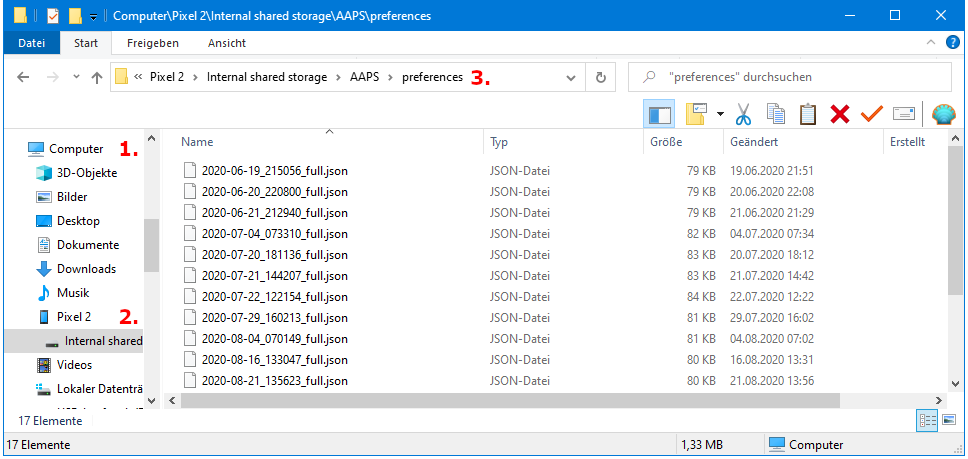
Información exportada
Among others the following information is part of the settings export:
- Automation events
- Config builder settings
- Local profile settings
- Objectives status incl. exam results
- Preferences incl. NS Client settings
Encrypted backup format
Settings backup is encrypted by a master password that can be set in Preferences .
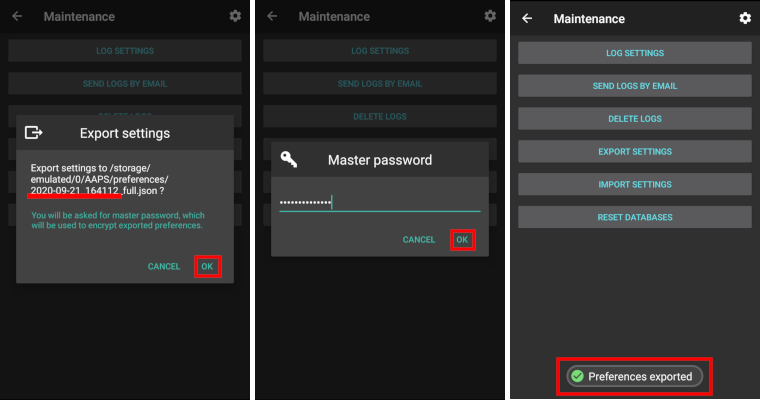
Exportar ajustes
- Menú Hamburguesa (esquina superior izquierda de la pantalla)
- Mantenimiento
- Exportar ajustes

- Date and time of export will be added to the file name automatically and displayed together with the path.
- Click ‘OK’.
- Enter master password and click ‘OK’.
- Successful export will be prompted at bottom of the screen.
Importar ajustes
- Menú Hamburguesa (esquina superior izquierda de la pantalla)
- Mantenimiento
- Importar ajustes

- All files from folder AAPS/preferences/ on your phone will be shown in the list.
- Select file.
- Confirm import by clicking ‘OK’.
- Enter master password and click ‘OK’.
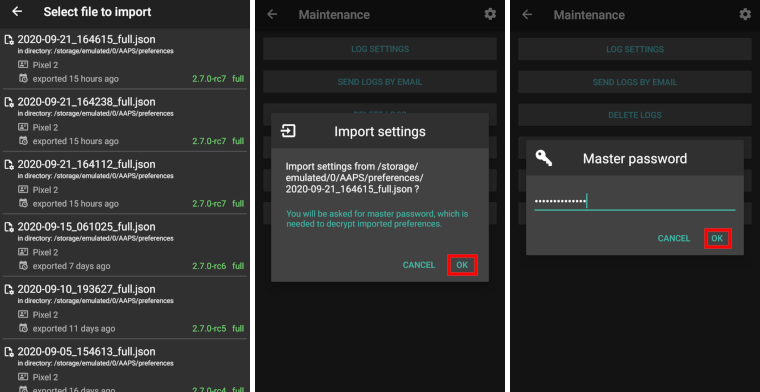
- Details on the preference file will be shown.
- Last option to cancel import.
- Click ‘Import’.
- Confirm message by clicking ‘OK’.
- AAPS will be restarted in order to activate imported preferences.
Note for Dana RS users
- La configuración de conexión de la bomba y también se importa AAPS en su nuevo teléfono con esto ya “conoce” la bomba y por lo tanto no es necesario iniciar un escaneo bluetooth.
- Por favor, empareja el nuevo teléfono y la bomba manualmente.
Import settings from previous versions (before AAPS 2.7)
- The “old” settings file (called ‘AndroidAPSPreferences’ - without file extension) must be in root folder of your smartphone (/storage/emulated/0).
- Do not put the “old” file in the same folder as the new exported settings (AAPS/preferences).
- You will find the “old” file on the bottom of the list in the import dialogue.
Transfer settings file
- Best way to transfer settings file to a new phone is via USB cable or cloud service (i.e. Google Drive).
- Manuals can be found on the web, i.e. Android help pages.
- If you experience problems with the transferred file try another way to transfer file.