다나 RS 펌프
다음은 2017년 이후의 다나 RS 펌프를 사용하는 경우에서 앱과 펌프를 설정하기 위한 안내입니다. 만약 오리지널 다나 R 펌프를 사용하는 경우에는 DanaR Insulin Pump를 확인하십시오.
New Dana RS firmware v3 can be used from AndroidAPS version 2.7 onwards.
- In DanaRS pump “BASAL A” is used by the app. Existing data gets overwritten.
Pairing pump
In AndroidAPS go to Config Builder and select ‘DanaRS’
오른쪽 상단에 있는 점 3개를 눌러 메뉴를 선택하세요. 설정을 선택하세요.
Select DanaRS Pair New Pump, and click your DanaRS serial number.
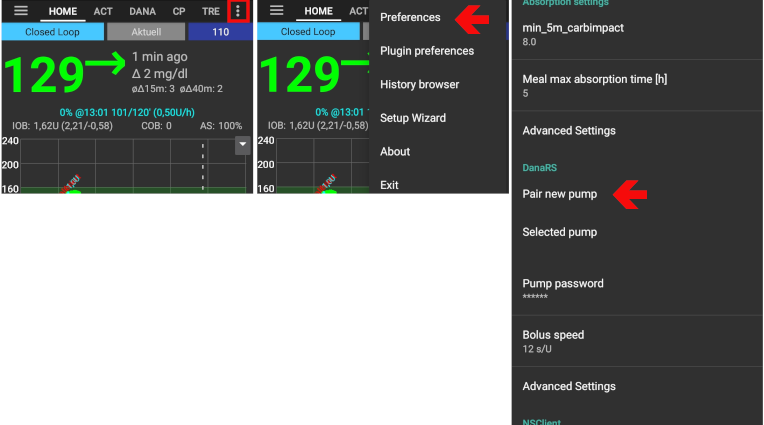
Select Pump password and input your password.
Default password
For DanaRS with firmware v1 and v2 the default password is 1234.
For DanaRS with firmware v3 the default password is a combination of production month and production date (i.e. month 01 and day 24). Open main menu on pump > review > information. Number 3 is production date.
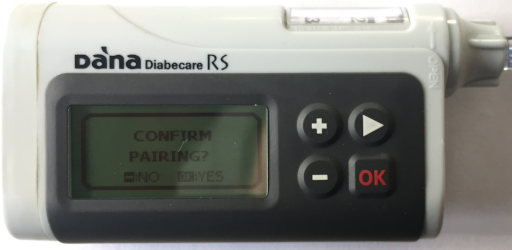
You have to confirm the pairing on the pump! That’s just the way you are used to from other bluetooth pairings (i.e. smartphone and car audio).
Select Bolus Speed to change the default bolus speed used (12sec per 1u, 30sec per 1u or 60sec per 1u).
Restart your phone.
Set basal step on pump to 0.01 U/h using Doctors menu (see pump user guide)
펌프에서 확장Bolus를 활성화하세요.
Change password on pump
Press OK button on pump
In main menu select “OPTION” (move right by pressing arrow button several times)
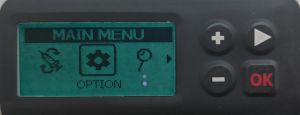
In options menu select “USER OPTION”

Use arrow button to scroll down to “11. password”
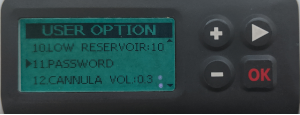
Press OK to enter old password.
Enter old password (Default password see above) and press OK
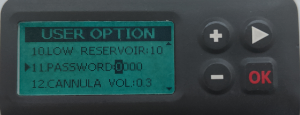
If wrong password is entered here there will be no message indicating failure!
Set new password (Change numbers with + & - buttons / Move right with arrow button).

Confirm with OK button.
Save by pressing OK button again.
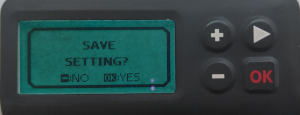
Move down to “14. EXIT” and press OK button.

Dana RS specific errors
Error during insulin delivery
Bolus 인슐린 주입 중 AAPS와 Dana RS의 연결이 끊기는 경우 (즉, Dana RS가 인슐린을 주입하는 동안 폰에서 멀어지는 경우), 다음과 같은 메시지가 뜨고 알람이 울릴 것입니다.
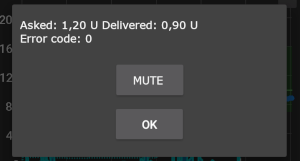
- In most cases this is just a communication issue and the correct amount of insulin is delivered.
- Check in pump history (either on the pump or through Dana tab > pump history > boluses) if correct bolus is given.
- Delete error entry in treatments tab if you wish.
- Real amount is read and recorded on next connect. To force this press BT icon on dana tab or just wait for next connect.
Special note when switching phone
새 폰으로 바꾸는 경우 다음의 과정들이 필요합니다:
- Export settings on your old phone
- Transfer settings from old to new phone
- Manually pair Dana RS with the new phone
- As pump connection settings are also imported AAPS on your new phone will already “know” the pump and therefore not start a bluetooth scan. Therefore new phone and pump must be paired manually.
- Install AndroidAPS on the new phone.
- Import settings on your new phone
Timezone traveling with Dana RS pump
다른 시간대로 이동하는 경우에 대한 정보는 펌프와 다른 시간대로의 이동 섹션을 참조하십시오.