SMS-команды
Безопасность прежде всего
AndroidAPS позволяет контролировать телефон ребенка удаленно посредством текстовых сообщений (смс). Если смс-коммуникатор активирован, не забывайте, что телефон, настроенный на подачу удаленных команд, может быть украден. Поэтому всегда защищайте смартфон хотя бы ПИН-кодом. Рекомендуется использовать надежный пароль или биометрические данные. * Кроме того, рекомендуется разрешить второй номер телефона <#authorized-phone numbers> _ для команд SMS. В том случае, если основной удаленный телефон будет потерян или украден, можно командой со второго телефона `временно отключить <#other> ` _ коммуникатор SMS. * AndroidAPS при помощи смс также сообщит, выполнены ли удаленные команды, такие как болюс или изменения профиля. Рекомендуется сделать такую настройку, чтобы подтверждающие тексты направлялись по меньшей мере на два разных телефона на тот случай, если один из них украден. * Если вы подаете болюс через SMS-команды необходимо вводить углеводы через Nightscout (NSClient, сайт...)! Если вы этого не сделаете, AAPS учтет правильное количество активного инсулина IOB, и будет считать, что активных углеводов COB слишком мало и, вероятно, не будет подавать корректировочный болюс, полагая, что у вас много активного инсулина. * Начиная с версии AndroidAPS 2.7 при использовании SMS-команд необходимо использовать приложение-аутентификатор с одноразовым паролем.
Настройка SMS-команд
- Большинство корректировок временных целей, слежение за работой ААПС и т. д. can be done on NSClient app on an Android phone with an internet connection.
- Болюсы не могут подаваться через Nightscout, но можно использовать SMS-команды.
- If you use an iPhone as a follower and therefore cannot use NSClient app, there are additional SMS commands available.
- В настройках Android телефон перейдите в приложения > AndroidAPS > Разрешения и включите SMS
Authorized phone numbers
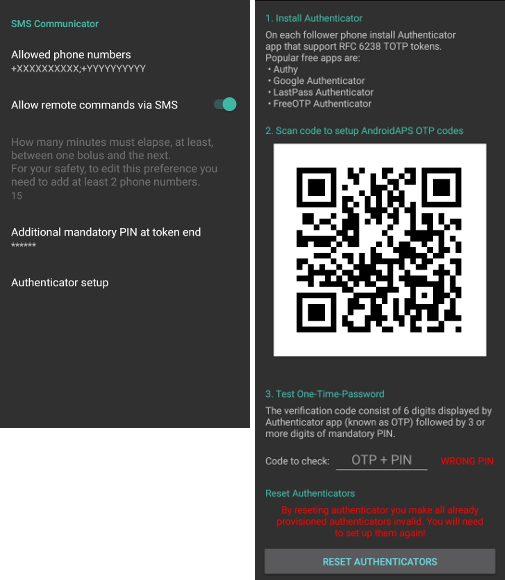
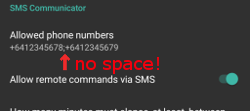
In AndroidAPS go to Preferences > SMS Communicator and enter the phone number(s) that you will allow SMS commands to come from (separated by semicolons - i.e. +6412345678;+6412345679)
Enable ‘Allow remote commands via SMS’.
Если вы хотите использовать более одного номера:
Введите только один номер.
Убедитесь, что этот телефон работает с алгоритмом путем отправки и подтверждения команды SMS.
Введите дополнительные номера, разделенные точкой с запятой, без пробела.
Minutes between bolus commands
- You can define the minimum delay between two boluses issued via SMS.
- For safety reasons you have to add at least two authorized phone numbers to edit this value.
Additionally mandatory PIN at token end
For safety reasons the reply code must be followed by a PIN.
PIN rules:
- 3 to 6 digits
- not same digits (i.e. 1111)
- not in a row (i.e. 1234)
Authenticator setup
Two-factor authentication is used to improve safety.
You can use any Authenticator app that supports RFC 6238 TOTP tokens. Popular free apps are:
- Authy
- Google Authenticator - Android / iOS
- LastPass Authenticator
- FreeOTP Authenticator
Install the authenticator app of your choice on your follower phone and scan the QR code shown in AAPS.
Test the one-time password by entering the token shown in your authenticator app and the PIN you just setup in AAPS. Пример:
- Your mandatory PIN is 2020
- TOTP token from the authenticator app is 457051
- Enter 4570512020
The red text “WRONG PIN” will change automatically to a green “OK” if the entry is correct. There is no button you can press!
The time on both phones must be synchronized. Best practice is set automatically from network. Time differences might lead to authentication problems.
Use button “RESET AUTHENTICATORS” if you want to remove provisioned authenticators. (By resetting authenticator you make ALL already provisioned authenticators invalid. You will need to set them up again)
Use SMS commands
Send a SMS to the phone with AndroidAPS running from your approved phone number(s) using any of the commands below.
The AAPS phone will respond to confirm success of command or status requested.
Confirm command by sending the code where necessary. Пример:
- Your mandatory PIN is 2020
- TOTP token from the authenticator app is 457051
- Enter 4570512020
Hint: It can be useful to have unlimited SMS on your phone plan (for each phone used) if a lot of SMS will be sent.
Команды
Commands must be sent in English, the response will be in your local language if the response string is already translated.
Замкнутый цикл
- ОТКЛЮЧИТЬ ЗЦ
- Ответ: цикл отключен
- ВКЛЮЧИТЬ ЗЦ
- Ответ: цикл включен
- СТАТУС ЗЦ
- Ответ зависит от фактического состояния
- зцикл не работает
- зцикл работает
- Остановлен (на 10 мин)
- ОСТАНОВИТЬ ЗЦ 20
- Зцикл остановлен на 20 минут
- ВОЗОБНОВИТЬ ЗЦ
- Ответ: Цикл возобновлен
Данные мониторинга
- BG/ГК
- Ответ: новая ГК: 5.6 4мин назад, дельта: -0,2 ммоль, активный инсулин IOB: 0.20 ед (болюс: 0.10 ед базал: 0.10 ед)
- CAL 5.6
- Response: To send calibration 5.6 reply with code from Authenticator app for User followed by PIN
- Ответ после получения правильного кода: Калибровка отправлена / Calibration sent (* Если установлен xDrip. Разрешение на прием калибровок должно быть включено в xDrip+*)
базал
- BASAL STOP/CANCEL
- Response: To stop temp basal reply with code from Authenticator app for User followed by PIN
- BASAL 0.3
- Response: To start basal 0.3U/h for 30 min reply with code from Authenticator app for User followed by PIN
- BASAL 0.3 20
- Response: To start basal 0.3U/h for 20 min reply with code from Authenticator app for User followed by PIN
- BASAL 30%
- Response: To start basal 30% for 30 min reply with code from Authenticator app for User followed by PIN
- БАЗАЛ 30% 50
- Response: To start basal 30% for 50 min reply with code from Authenticator app for User followed by PIN
болюс
Remote bolus is not allowed within 15 min (this value is editable only if 2 phone numbers added) after last bolus command or remote commands! Therefore the response depends on the time that the last bolus was given.
- Болюс 1.2
- Response A: To deliver bolus 1.2U reply with code from Authenticator app for User followed by PIN
- Ответ B: Удаленный болюс недоступен. Повторите позже.
- БОЛЮС на 0.60 ЕДЫ
- Если вы зададите необязательный параметр прием пищи MEAL, то будет задано значение временная цель прием пищи MEAL (значения по умолчанию: 90 мг/дл, 5,0 ммоль/л на 45 мин).
- Response A: To deliver meal bolus 0.60U reply with code from Authenticator app for User followed by PIN
- Ответ B: Удаленный болюс недоступен.
- УГЛИ 5
- Response: To enter 5g at 12:45 reply with code from Authenticator app for User followed by PIN
- УГЛИ 5 17:35/5:35PM
- Response: To enter 5g at 17:35 reply with code from Authenticator app for User followed by PIN
- EXTENDED STOP/CANCEL
- Response: To stop extended bolus reply with code from Authenticator app for User followed by PIN
- EXTENDED 2 120
- Response: To start extended bolus 2U for 120 min reply with code from Authenticator app for User followed by PIN
Профиль
- СТАТУС ПРОФИЛЯ
- Ответ: Профиль1
- СПИСОК ПРОФИЛЕЙ
- Ответ: 1. ` Profile1 ` 2. ` Profile2 `
- PROFILE 1
- Response: To switch profile to Profile1 100% reply with code from Authenticator app for User followed by PIN
- PROFILE 2 30
- Response: To switch profile to Profile2 30% reply with code from Authenticator app for User followed by PIN
Другое
- ОБНОВИТЬ НАЗНАЧЕНИЯ
- Ответ: Синхронизировать назначения с NS
- ПЕРЕЗАПУСТИТЬ NSCLIENT
- Ответ: Перезапуск NSCLIENT 1 получатель
- ПОМПА
- Response: Last conn: 1 min ago Temp: 0.00U/h @11:38 5/30min IOB: 0.5U Reserv: 34U Batt: 100
- PUMP CONNECT
- Response: Pump reconnected
- PUMP DISCONNECT 30
- Response: To disconnect pump for 30 minutes reply with code from Authenticator app for User followed by PIN
- ОТКЛЮЧИТЬ/ОСТАНОВИТЬ СМС
- Ответ: Чтобы отключить удаленную службу SMS ответьте кодом Any. Имей в виду, что вы сможете его повторно активировать только непосредственно с главного смартфона AAPS.
- ЦЕЛЬ ПРИЕМ ПИЩИ/НАГРУЗКА/ГИПО MEAL/ACTIVITY/HYPO
- Response: To set the Temp Target MEAL/ACTIVITY/HYPO reply with code from Authenticator app for User followed by PIN
- ЦЕЛЬ ОСТАНОВИТЬ/ОТМЕНИТЬ
- Response: To cancel Temp Target reply with code from Authenticator app for User followed by PIN
- СПРАВКА
- Ответ: ГК, ПЕТЛЯ, НАЗНАЧЕНИЯ, .....
- СПРАВКА БОЛЮС
- Ответ: БОЛЮС 1.2 БОЛЮС 1.2 НА ЕДУ
Устранение неполадок
Множество SMS
Если вы получаете одно и то же сообщение снова и снова (напр. переключение профиля), вероятно, у вас произошло закольцовывание с другими приложениями. Это может быть xDrip+, например. If so, please make sure that xDrip+ (or any other app) does not upload treatments to NS.
If the other app is installed on multiple phones make sure to deactivate upload on all of them.
Команды SMS не работают на телефонах Samsung
Была жалоба на остановку работы SMS команд после обновления на телефоне Galaxy S10. Could be solved by disabling ‘send as chat message’.